WhatsApp Chat Export
Safety & Efficiency
A powerful WhatsApp chat export extension with one-click support to export WhatsApp contacts, group members, and unsaved numbers to Excel, CSV, or VCard.
CONTACTS EXPORTED
USER RATING
TRUSTING USERS
DAILY UNLOCKS
Export Chat History with Confidence
Trusted by 80,000+ users for B2B leads collection and seamless CRM migration. Back up entire conversations as precise HTML replicas or convert over 1.2M contacts to Excel/CSV for instant data analysis.
Perfect HTML Replica
Export your chats into an offline HTML file. We beautifully reconstruct the WhatsApp interface so you can read, search, and preserve your important or legal conversations exactly as they originally looked.
Complete Details Backup
Convert unstructured chat text into neat, organized spreadsheets. Completely backup all conversation details and instantly import them into HubSpot, Salesforce, or your custom CRM workflow.
Why Choose WhatsApp Number Extractor?
Focus on high-quality leads with granular control and detailed data fields. Safe, fast, and 100% private.
Bulk Export WhatsApp Group Numbers & Members
Need to extract leads from groups? Our tool helps you download WhatsApp phone numbers from any group instantly with precision.
- ✓Exclude Admins: Automatically filter out group administrators to keep your list clean.
- ✓Batch Selection: Select multiple groups to extract WhatsApp numbers in one click.
WhatsApp Chat Export for Contact Extraction
Don't just save messages. Turn your active conversations into a valuable contact list.
- ✓From Chat List: Extract all phone numbers directly from your WhatsApp chat history list.
- ✓Country Filter: Filter by specific countries to segregate your WhatsApp number export for targeted marketing.
Download Contacts from WhatsApp to Excel with Full Details
Get comprehensive insights compatible with your CRM. We provide more than just phone numbers.
- ✓Rich Data Fields: Export 12+ columns including Public Display Name, Country Code, Is Business status, and Saved Name.
- ✓Chat Context: Includes Last Message content and Date to help you recall the conversation context effortlessly.
- ✓Flexible Formats: One-click to save WhatsApp Contacts to Excel, CSV, or VCard (VCF) for seamless integration.
Smart Filters to Export WhatsApp Group Contacts
Ensure your WhatsApp chat export data is clean, deduped, and instantly ready for your CRM.
- ✓Skip Saved Contacts: Toggle the "Filter saved contacts" option to download WhatsApp numbers of unsaved (new) customers only.
- ✓Clean Export: Removing duplicates and existing contacts makes this the most efficient WhatsApp contact saver tool.
How to perform a quick WhatsApp Chat Export?

Select Format
Choose the perfect format for your needs. Use HTML for a pixel-perfect chat replica, Excel for data analysis, or CSV for easy CRM integration and contact management.
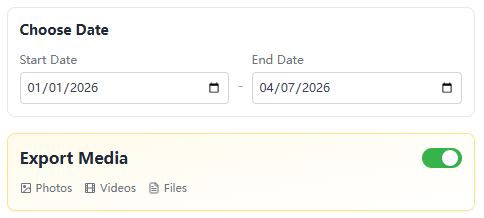
Select Media & Time Range
Choose specific time periods and decide whether to include photos, videos, or documents. Filtering by date helps you extract precisely the chat history you need without unnecessary data.
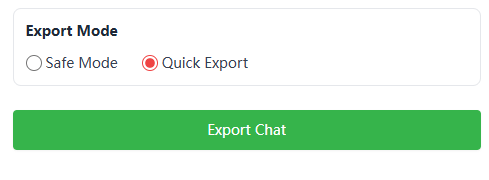
Perform Chat Export
Click to launch the export process. Our tool will securely compile your chat history, media, and contacts into a single package, ready for instant download to your Local PC.
Compare WAExport with Competitors
Stop paying per-message fees and waiting for API approvals. See why over 50,000 businesses prefer WAExport over WAppMaster, Sheetwa, and WAContactSaver.
Users Love Our WhatsApp Chat Export Tool — Real Reviews
"The ability to filter by country and export to Excel saved me hours. I can easily segment my WhatsApp leads now."
David Chen
Growth Marketer
"I needed the Public Display Name to personalize my outreach. This tool captures it perfectly along with the Last Message date."
Sarah Jones
Sales Manager
"The 'Message to Unlock' model is generous. I get enterprise-level features like VCard export and group filtering easily."
Ahmed Hassan
Small Business Owner
Frequently Asked Questions
WAExport is considered the safest WhatsApp number extractor because it operates 100% locally in your browser. It does not engage in any automated scraping behavior that violates WhatsApp's policies. It simply extracts the data already loaded in your web session, keeping your account entirely secure.
It's easy. Open the extension, navigate to the 'Export From Group' section, select the groups you want to scrape, and click export. You can instantly download WhatsApp phone numbers from multiple groups into a single Excel or CSV file.
Currently, we focus on helping you export contacts from your WhatsApp chat list, including metadata like the Last Message and date. You can also export WhatsApp chat history to Excel for full messages to save every detail for a complete backup. This feature is perfect for building lead lists from your active conversations.
Absolutely. We support multiple formats. You can easily convert WhatsApp number to Excel, WhatsApp contacts to CSV, or even VCard (VCF) format for easy import into your phone or CRM software.
Unlike the native WhatsApp export feature which often limits users to 40,000 messages, WAExport is built to overcome these native export limits. Our tool handles bulk data extraction efficiently, making it the most reliable solution for entire WhatsApp chat backup and large-scale contact saving.
Ready to Download WAExport?
Join thousands of marketers using the ultimate WhatsApp Chat Export tool to streamline B2B leads, automate CRM migration, and secure local backups with zero limits.