Choose the groups you need
Export one group, selected groups, or all groups in a single workflow.
WAExport group number guide
Turn WhatsApp group members into an organized contact file without copying numbers one by one. This guide shows how to select groups, filter unsaved numbers, exclude admins, and download the results with WAExport.
Export one group, selected groups, or all groups in a single workflow.
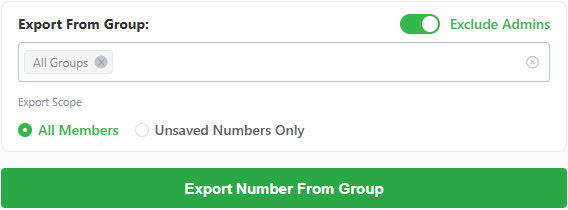
Export all members or unsaved numbers only, with an option to exclude group admins.
Save WhatsApp group contacts as Excel, CSV, or VCF for your next workflow.
Four simple steps
The Group export panel keeps group selection, filters, file formats, and download controls in one place.
After installing WAExport, open Chrome Extensions, pin WAExport to the toolbar, then sign in at web.whatsapp.com and click the WAExport icon.
Keep WhatsApp Web open while WAExport loads your group list.


Select Excel for sorting and analysis, CSV for importing into business tools, or VCF when you want to add the exported numbers to a contact list.
Choose a single group, several groups, or All Groups. Then set the exact member scope before exporting.
whatsapp-group-numbers.xlsx
Export complete
Country code
+1
Country
United States
Phone number
+1 202 555 0148
Display name
Alex
Group name
Sales Team
Contact status
Unsaved
Click Export Number From Group. WAExport organizes the member information and downloads the selected Excel, CSV, or VCF file to your device.
The exported file is generated locally in your browser.
Export results
WAExport organizes useful member and group details into clear columns, so the file is ready for filtering, contact management, or import.
Open the WAExport group number extractor and turn the members you need into an organized downloadable file.