2026 WhatsApp Chat Export Guide:How to safely export & backup your Chat
For both personal memory keeping and business compliance, performing a WhatsApp Chat Export is a crucial skill. Whether you are archiving legal evidence or simply saving important conversation logs, WhatsApp provides a native way to back up your data.
In this guide, we will walk you through the standard process. This official method is a 100% safe foundational way to save your history without risking account security or violating WhatsApp's terms of service. For users who need more flexible options, we will also introduce more powerful third-party tools.
How to Export WhatsApp Chat to Txt Format (Official Method)
The native feature allows you to export a copy of the chat history from an individual or group chat. The result is a .txt file attached to an email, which makes it universally readable on any computer.
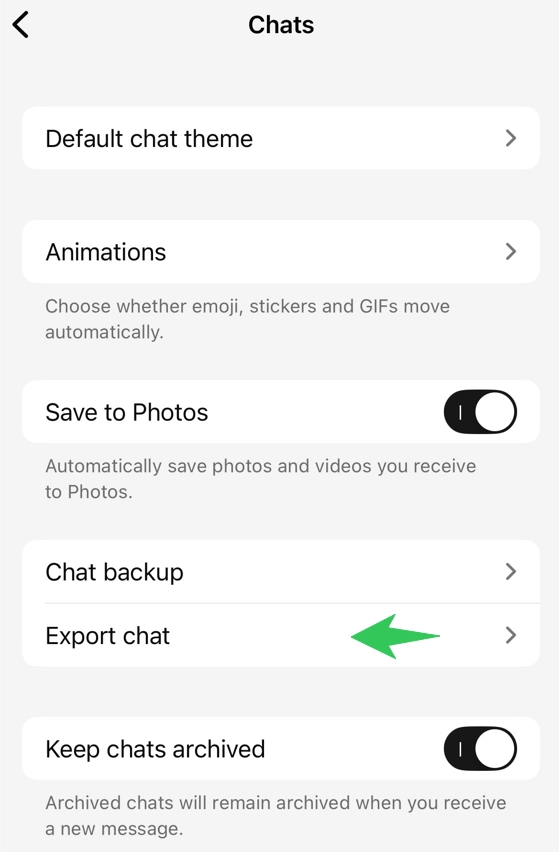
Exporting Steps for Android Users:
- Open WhatsApp and go to the chat you want to save.
- Tap More options (the three vertical dots) > More > Export chat.
- Choose whether to Include Media or proceed Without Media.
- Select your email app (like Gmail) and send the file to yourself to complete the WhatsApp chat export.
Exporting Steps for iOS Users:
- Open the chat you wish to export.
- Tap the contact's name or group subject at the top.
- Scroll down and tap Export Chat.
- Select Attach Media or Without Media.
- Share the file via Mail to receive the
.txtlog.
Understanding WhatsApp Chat History Export Android to iPhone
A common misconception is that the email export function can be used to transfer data between devices. Many users search for WhatsApp chat history export Android to iPhone hoping to restore these chats into the app on their new device.
It is important to note the difference:
- For Reading (Email Export): The method described in this blog creates a static file for reading only. You can view the messages on your new iPhone, but they cannot be imported back into the WhatsApp app interface.
- For Restoring (App Transfer): If you need to migrate chat history so it appears inside the WhatsApp app on a new iPhone, you must use the "Move to iOS" app during the initial phone setup, not the email export feature.
Important Limitations & Safety Tips of Chat Exporting
When performing a WhatsApp Chat Export, it is important to understand the technical limitations set by WhatsApp to ensure smooth delivery.
- Email Size Limits: Due to maximum email size restrictions, you can only send up to 10,000 messages if you attach media, or 40,000 messages if you export text only.
- Security Warning: Please distinguish between the official method and compliant third-party tools. Tools that are not authorized by WhatsApp and use "scraping" or unauthorized API calls may indeed violate the terms of service and lead to account bans. We recommend using the official feature first, or choosing verified, compliant solutions only after fully understanding the risks.
Advanced Export with WAExport
While the official method is safe, it has clear limitations: it only produces .txt files, has strict email size restrictions, and cannot export in bulk. If you need a more professional and flexible export experience, we recommend using WAExport—a verified, compliant solution that offers rich features while keeping your account safe.
WAExport offers capabilities far beyond the official export feature:
- Multiple Formats Supported: Export your chats as HTML, CSV, or EXCEL to suit different use cases.
- HTML Replica of Chat Interface: The HTML export faithfully recreates the WhatsApp chat interface, including message bubbles, timestamps, and avatars. It also supports exporting all types of media files such as images, videos, and voice messages, preserving your conversations in their native form.
- CSV / EXCEL for CRM Integration: Export chat data in a structured spreadsheet format for easy import into Salesforce, HubSpot, or any other CRM client, empowering customer follow-ups and business analytics.
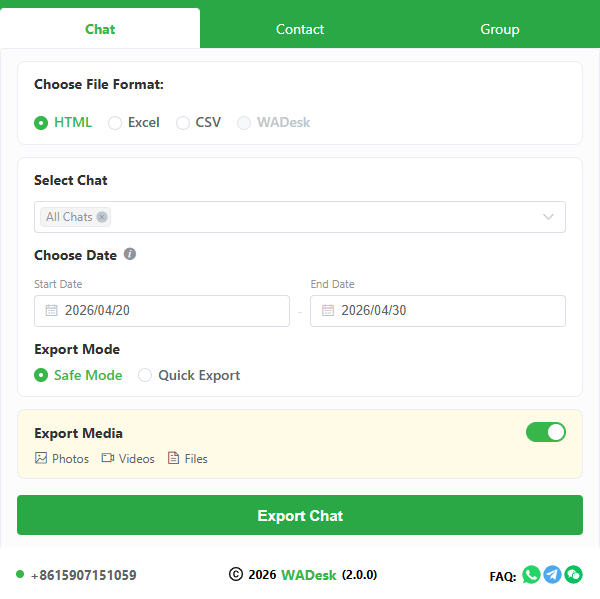
Try the more powerful WhatsApp Chat Export today and make your data truly work for you.
Real-time Chat Backup: A Proactive Security Strategy
Exporting chat history is a reactive measure. For business users and individuals who require long-term archiving, real-time chat backup is a far more proactive strategy. Instead of manually exporting when needed, you can automatically save every message to your local environment as it happens.
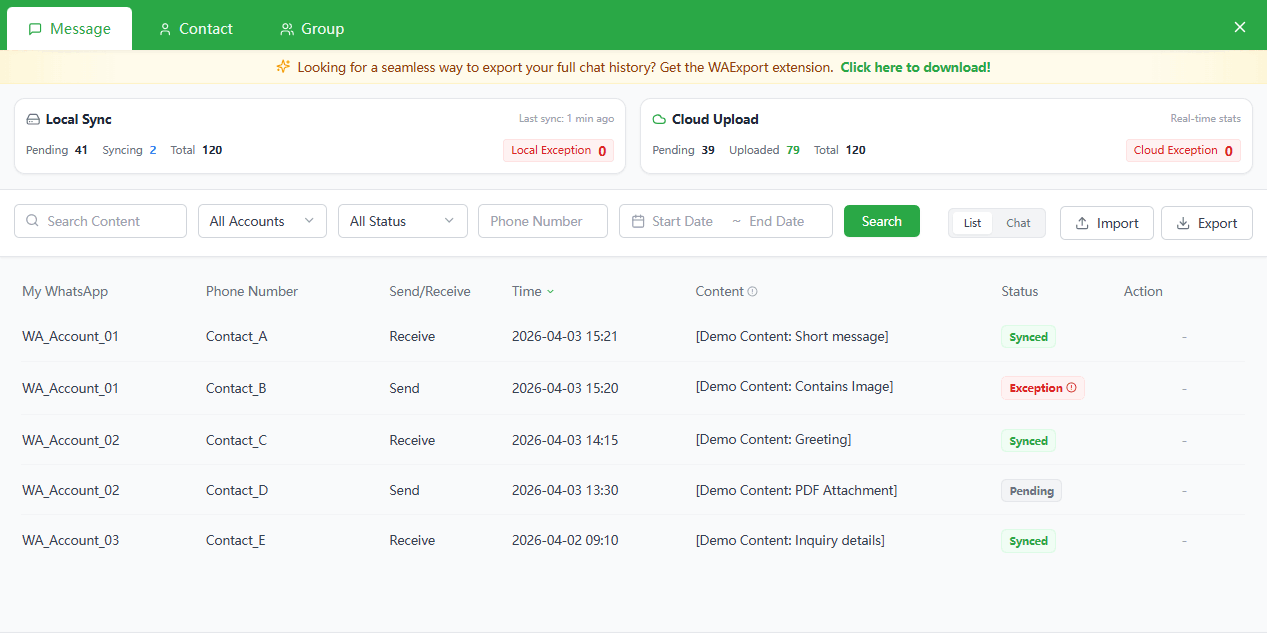
WADesk is a CRM tool built specifically for WhatsApp. In addition to helping teams manage customer conversations efficiently, it offers powerful real-time backup capabilities:
- Chat & Backup Simultaneously: During normal WhatsApp conversations, WADesk automatically syncs every message to your local server or computer in real time, with zero manual intervention.
- Enterprise-Grade Security: Data is stored in an environment you control, eliminating cloud leakage risks and meeting strict enterprise requirements for data sovereignty and compliance.
- Full CRM Capabilities: Beyond backup, WADesk provides customer tagging, quick replies, multi-account management, and more—turning your chat history into trackable, analyzable business assets.
If you have higher demands for data security or want to automate your chat archiving, explore the complete WhatsApp Chat Backup solution.
Conclusion
Whether you need to save an occasional chat or implement enterprise-grade data archiving, this guide has provided a clear roadmap for every scenario. For everyday, low-frequency exports, WhatsApp's official method remains simple and safe. When you need more flexible formats, polished archives, or CRM integration, WAExport is the ideal professional tool. For business users, WADesk's real-time backup capabilities offer the highest level of data security. Choose the solution that fits your needs, and ensure your digital memories and important business records are always protected.
2026 Best WhatsApp Chat Backup & Export Tools Side-by-Side Review: Who Reigns as the King of Efficiency and Security?
A multi-dimensional comparison of mainstream WhatsApp export tools covering speed, security, and ease of use. Discover why WAExport is the go-to solution for cross-border e-commerce and B2B trade teams.
WhatsApp Group Marketing 2026: Ultimate B2B Strategy Guide
Master WhatsApp Group Marketing in 2026 with our B2B guide. Learn strategies, community management, and automation tips to turn members into loyal customers.